
Setting up funding sources in Projectmates Capital Planning module is a simple two part process. First a fund must created in the system & then that fund may be funded using the Fund Transaction tool. The steps for setting up a CIP fund and crediting that fund are outlined below.
Note: You must have Admin rights to the Capital Planning module in order to complete the steps outlined in this article.
Step One: Creating a New Fund
- Navigate to the Capital Planning module under Program Management
- Select Funds from the left side menu that appears
- Click the + Fund button in the upper right hand corner
- Enter in the fund Group, Number, and Name
Helpful Hints: (a) The Fund Group is designed to be repeatable in order for organizations to easily cluster and report on different funding types. (b) The Fund Number and Name must be unique. Below are two ways that organizations leverage these fields.
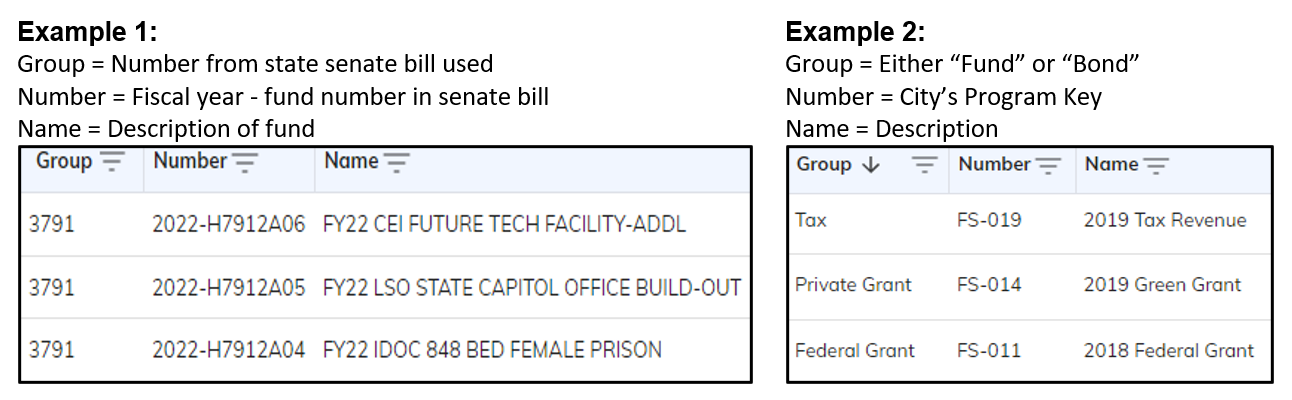
- Click Save
Step Two: Crediting a Fund
- Navigate to the Fund Transaction section of Capital Planning
- Click the + Transaction button in the upper right hand corner
Helpful Hint: Both Credits and Debits can be initiated from the Fund Transaction module. By default the selection will be set to credit.
- Select the fund that you want to add money to
- Enter in the dollar amount that needs to be added to the fund
- Enter in the Fiscal Year that the money is associated with
- Enter in the Date Posted
Helpful Hint: The two most common use cases for Date Posted are, (a) when the money was approved/made available or (b) when the fund credit was entered into Projectmates.
- Fill in any custom fields that your organization is leveraging
- Click Save
Helpful Hint: A fund can be credited as many times as your organization needs. If you have a fund that receives new funding each year, a new fund does not need to be created. That money can simply be added by initiating a new Fund Transaction against the existing fund.